
Should an organization need to deploy QoS in their environment for Teams, you’ll need to push settings out to your clients. Intune is the way to go, unless you’re still in the Active Directory phase of things and using Group Policy.
Well, there’s no point in me explaining how to do this, as Edgar Avellan has already done everything:
https://github.com/eavellan/intune-teams-qos-deploy
Now, a couple of caveats. First, I’ve long been a fan of NOT configuring QoS unless you are having call quality issues and can see issues in the Call Quality Dashboard or your network gear. Why not?
- Most modern networks have more than enough bandwidth. QoS only helps when their is congestion.
- There’s no QoS on the Internet. Only on your LAN/WAN.
- You need to control the endpoint – byod devices won’t get prioritized
- Okay, not 100% true. You could have your network gear mark traffic based on the source port number. However, this WILL lead to non-Teams traffic being marked. Marking the traffic on the client usually means that you can specific the executable name “ms-teams.exe” to avoid this. You will, however, need to use this approach to classify and tag traffic that isn’t generated from your managed endpoints:
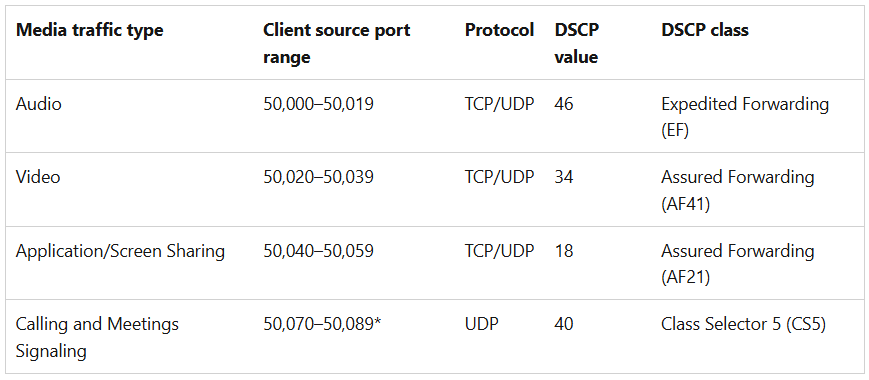
- Do you have a plan for your wifi? How much of your traffic in your offices is connected wirelessly vs wired?
- Do you have a plan for marking inbound traffic? You need a firewall – or a router just past it – that can apply DSCP tags, as the traffic inbound from the Internet won’t have them. Otherwise, you’re only tagging outbound traffic.
- What about non-Windows devices: web clients, Mac clients, and smart phones? Do you have control over these devices, and the ability to manage and monitor?
- How about VPNs, SASE, ZTNA? What impact do they have on your DSCP markings? Do you enforce “always on”, so that traffic from a machine on your LAN in your office is immediately tunnelled out to the VPN/SASE/ETC device, even if it you’re communicating with someone who is also on your LAN in one of your offices?
If you’re thinking of doing QoS, your first step is to find evidence that says you need to do it (and user complaints about bad calls aren’t sufficient here). Then, plan, plan, plan, plan! Implementation and operations are significantly bigger that they appear at first glance.

