
Okay, apologies for huge post title, but I wanted to make sure that all the important bits were represented.
Teams has “Emergency Calling Policies” that handle location lookup settings and notifications, and “Emergency Call Routing Policies”, ECRPs. ECRPs establish Emergency calling masks and dial strings, along with a PSTN Usage which in turn points to a route to send emergency calls to. It might look something like this:
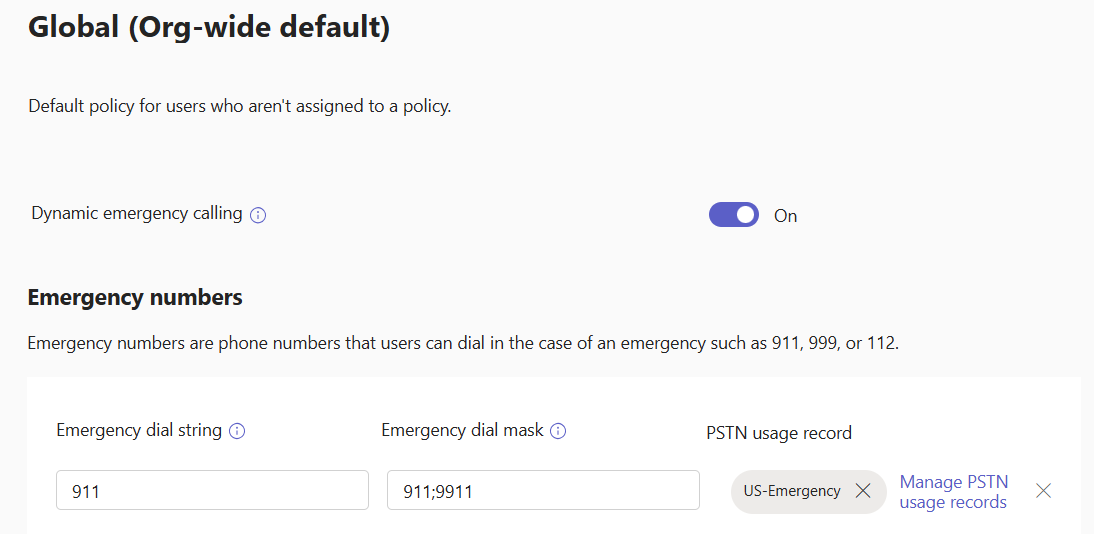
When this policy is assigned to a user OR to a site that a Teams client is in, this policy tells that client when 911 or 9911 are called by the user, Teams should call 911 vai the US-Emergency PSTN Usage.
The PSTN Usage is a Direct Routing configuration item that tells Teams where to route the emergency call. US-Emergency is where 911 calls go in the US, “DE-Emergency” might be the PSTN Usage for Germany for 112 calls. You wouldn’t want to mix those two up.
The Dial String and Dial Mask portion of the ECRP apply to ALL methods of PSTN access in Teams. That includes Direct Routing, and also Calling Plans and Operator Connect. CP and OC users will have emergency policies appropriate to their location/country set by the OC provider, or Microsoft in the case of Calling Plans. That includes dial strings and dial masks, as well as under-the-hood bits on call routing.
However, in my previous post I outlined changes to notifications for emergency calls that allowed different modalities and destinations to be configured for emergency calls to different Emergency dial strings. If you want “555” to be a number for security in a hospital with different notifications than when 911 is called, you need to first define 555 in an ECRP regardless of whether you’re using Direct Routing, Operator Connect, or Calling Plans. Then you can define the Emergency Calling Policy and appropriate notifications.
If you’re OC or CP and sticking with the basics of emergency calling and “911 is all we need”, you can’t escape needing to configure an ECRP if you are implementing Shared Calling. I mentioned above that OC and CP users have emergency policies pushed to their client by their OC provider or Microsoft (for CP). Well, if you are a shared calling user, you do not have a phone number assigned to you, and so you are not having the phone number and associated calling (and emergency calling) policies pushed to you. For regular calls, the Shared Calling number assigned to the Auto Attendant (it’s typically an Auto Attendant) handles call routing just fine – dump everything out to the carrier. For emergency calls, the Teams client needs to know the Emergency Dial Mask and Emergency Dial String. The only way for Shared Calling users to receive this configuration is via an ECRP. In the ECRP, you would NOT define a PSTN usage for OC and CP shared calling scenarios, but you would do so for DR scenarios. (The instructions on learn.microsoft.com are pretty good, should you venture into shared calling with OC or CP). This ECRP for OC and CP users is assigned to the user or it can be assigned to a site, maybe.
Note that if you have Direct Routing AND you want to use OC or CP for Shared Calling, things break a bit. Your OC and CP emergency calls should go to your OC provider or Microsoft (for CP). However, if you are also using DR and you’ve assigned a site-based ECRP that includes a DR PSTN Usage, that site-assigned ECRP takes precedence over the user-assigned CP and OC ECRPs. As a result, emergency calls from CP and OC users in that site will go to the DR provider. This could be very bad if that DR provide only accepts calls from their own numbers. It will only be somewhat bad if they’ll accept calls from any number but charge (typically three figures) to handle that call. Things might be okay if your OC provider is also your DR provider AND you talk to them and they’ll happily accept this scenario. Otherwise, avoid this scenario. Either don’t do site based ECRP, or use DR for your Shared Calling instead of CP and OC. AND, if you decide to not do site based ECRP and you are in the US, be aware that you are very likely in violation of emergency calling legislation that calls for automatic location determination… So, don’t do that, or hand this decision off to the corporate lawyers. (I’ll let you pick which is easier!)
Next up, I’ll show the configuration behind that scenario with the hospital using 555 for internal security notifications.
 Bump in the net